 HaruHost
Tunnel Paid
Host from your own PC. Friends join without port forwarding.
The Tunnel gives a game server running on your own machine a public address through one of 14 relay regions. Friends join even behind CGNAT, on Starlink or on mobile internet, with no router, firewall or public IP setup. Turn it on from the server's Details tab. Friends join 28 games through the Tunnel on Windows, and 32 games when HaruHost runs as a service on Linux.
Your own PC as the host
A rented game server is a machine in a datacenter with a public address. The Tunnel gives the machine you already own that public address, so it does the same job: no monthly server rent, no player slots, and the server, its files and mods stay yours.
-
1
Run the server at home
On your PC or a home server, Windows or Linux. The game server keeps running on your hardware; the Tunnel does not move it anywhere.
-
2
Turn on the Tunnel
On the server's Details tab, switch the Tunnel on and pick the relay region closest to you or your players. Your server connects outward, so nothing on your router has to open.
-
3
Share the join details
The Details tab shows what players need: the address (the invite code for V Rising), the server title and the password if the server has one.
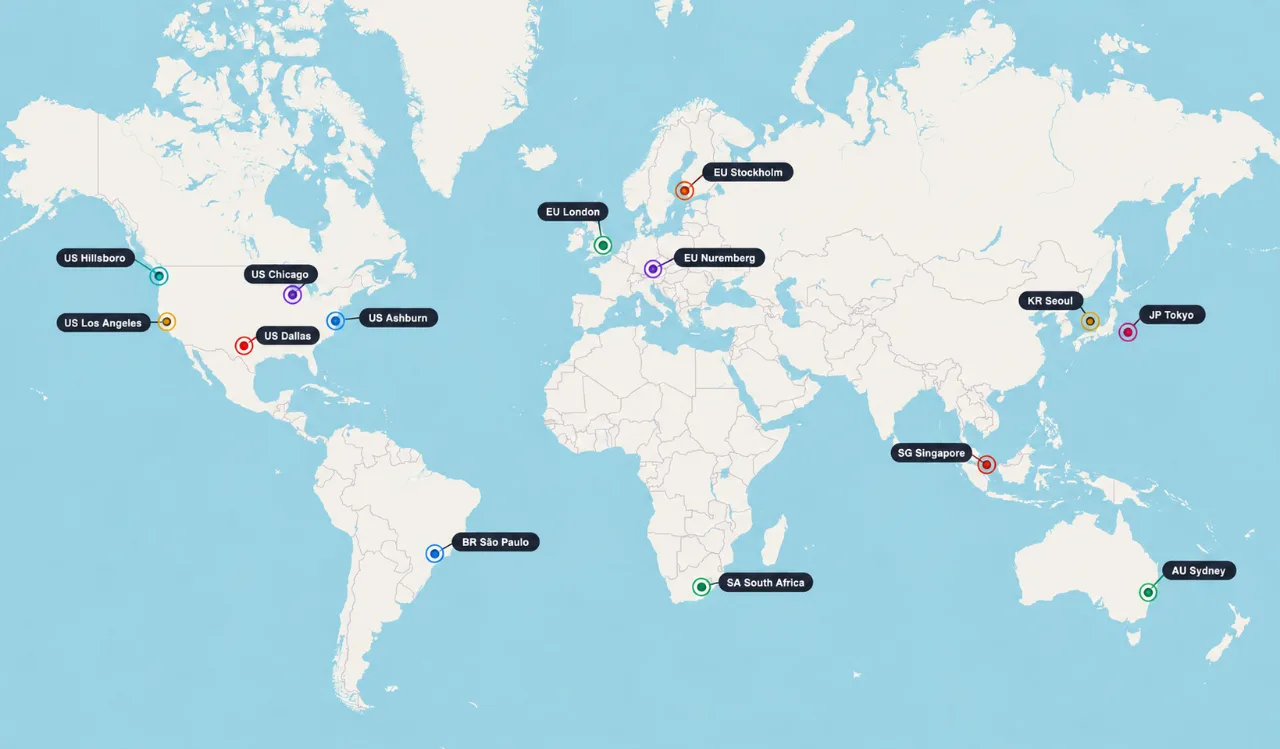
14 relay regions on six continents
Choose the region closest to you or your players for the best latency. No region near you? Request one in the HaruHost Discord; requests decide where new regions go.
Europe
London, Nuremberg, Stockholm
North America
Ashburn, Chicago, Dallas, Hillsboro, Los Angeles
South America
São Paulo
Asia
Tokyo, Seoul, Singapore
Africa
South Africa
Oceania
Sydney
34 games with the Tunnel
How friends join depends on the game. Each game page lists everything else HaruHost does for it.
In the game's server list
Friends find the server in the game's own server list, like any public server.
- ARK: Survival Ascended · Join Game → Unofficial with Show Player Servers on; search the server title
- Palworld · Community Servers; search the world name, or connect by address
- Path of Titans · Windows
- The Isle · Windows
Direct join
Friends join by the address on the server's Details tab, the same way as any dedicated server of these games.
- 7 Days to Die · Join a Game → Connect to IP
- Abiotic Factor
- Arma 3 · Windows
- Arma Reforger · Windows
- Conan Exiles · Windows · direct connect
- Core Keeper · Join with IP
- Craftopia
- Don't Starve Together
- Eco
- Enshrouded · Windows
- Factorio
- Frozen Flame
- Hytale · Servers → Add Server
- Minecraft: Java Edition · Multiplayer → Add Server
- Necesse
- Project Zomboid · Favorites → add the server
- Satisfactory · Server Manager → Add Server
- Soulmask · Windows · Online Game → direct connect
- Terraria
- tModLoader (Terraria)
- Valheim · Windows · Join Game → Add server
- Windrose · Connect to server → Direct IP
Direct join, not in the server list yet
The game has a server list, but a tunneled server does not show there yet. Friends join by the address on the Details tab.
Invite code
Friends paste the server's invite code, shown on the Details tab, into the game's Direct Connect.
- V Rising · Windows · Direct Connect with the invite code
On Linux, with HaruHost as a service
When HaruHost runs as a service on Linux, which the one-command install sets up, friends join these games' tunneled servers this way. Games marked Windows above join this way on Linux.
- ARK: Survival Evolved · Server list · search the Server Title
- Arma 3 · Server list · search the Server Title
- Arma Reforger · Server list · search the Server Title
- Conan Exiles · Server list · search the Server Title
- Enshrouded · Steam favorite, then the game's Favorites
- ICARUS · Server list · search the Server Title
- Rust · Server list · search the Server Title
- Sons of the Forest · Server list · search the Lobby Name
- Soulmask · Server list · search the Server Title
- StarRupture · Direct join
- The Forest · Server list · search the Lobby Name
- V Rising · Server list · search the Lobby Name
- Valheim · Direct join · Join IP
Tunnel questions
What is the HaruHost Tunnel?
A public connection path for game servers that run on your own machine. The server stays on your hardware; HaruHost provides the address players join through.
Why use the Tunnel?
It saves the hours or days that firewall rules, port forwarding and public IP setup can take. Supported games just work, and you turn the Tunnel on or off in HaruHost whenever you like, while manual firewall and port forwarding rules stay open until you remove them yourself.
Does the Tunnel work behind CGNAT?
Yes. It is made for CGNAT and similar networks where players cannot reach your home network directly, such as Starlink and mobile internet: your server connects outward through HaruHost instead.
Do I still need port forwarding or firewall rules?
No. Avoiding router port forwarding and firewall setup is the main reason to use the Tunnel.
How do I turn the Tunnel on?
Open the game server, go to the Details tab and turn on the Tunnel switch; a running server restarts to apply it. Then share what the Details tab shows: the address (the invite code for V Rising), the server title and the password if your server has one. Windrose also needs Auto Config turned on so HaruHost can write the tunnel address into its settings.
Which games support the Tunnel, and how do friends join?
34 games. Friends join in the game's server list: ARK: Survival Ascended, Palworld, Path of Titans on Windows and The Isle on Windows; by direct join, as any dedicated server of the game: 7 Days to Die, Abiotic Factor, Arma 3 on Windows, Arma Reforger on Windows, Conan Exiles on Windows, Core Keeper, Craftopia, Don't Starve Together, Eco, Enshrouded on Windows, Factorio, Frozen Flame, Hytale, Minecraft: Java Edition, Necesse, Project Zomboid, Satisfactory, Soulmask on Windows, Terraria, tModLoader (Terraria), Valheim on Windows and Windrose; by direct join, not in the game's server list yet: RuneScape: Dragonwilds; with an invite code: V Rising on Windows. When HaruHost runs as a service on Linux, friends join in the game's server list: ARK: Survival Evolved, Arma 3, Arma Reforger, Conan Exiles, ICARUS, Rust, Sons of the Forest, Soulmask, The Forest and V Rising; by direct join: StarRupture and Valheim; through a Steam favorite, then the game's own Favorites: Enshrouded. When HaruHost runs as a service on Linux, tunneled DayZ, Path of Titans and The Isle servers appear in each game's own server list at their tunnel addresses.
Does HaruHost host my game server?
No. The game server keeps running on your own hardware. The Tunnel only provides the network path players use to reach it.
Can I choose the relay region?
Yes, any of the 14 regions. Pick the one closest to you or your players for the best latency.
Does the Tunnel add latency?
A little, because traffic passes through the relay region. For most servers it is negligible unless the region is far away; a stable internet connection where the server runs matters more.
Does the Tunnel hide my home IP?
Players connect to the relay address, so your home IP is not shown to them. Add-ons or other software on the machine that connect to outside services on their own still use your home connection.
What if someone attacks the tunnel address with a DDoS?
An attack on the tunnel address hits the relay service, not your connection. Your machine is not immune to attacks by other means, for example if its real IP is known some other way or other services are exposed.
Do players need anything extra to join through the Tunnel?
No. The Tunnel passes the game's own traffic through unchanged, so players join with the normal game, as they would without the Tunnel.
Is bandwidth unlimited?
No. Each plan has a bandwidth ceiling, monitored to keep traffic fair. Game server traffic is small, so for most servers this is not a concern unless the server is very busy.
Can I use the Tunnel for other things than game servers?
No. The Tunnel is only for supported game servers.