Stop renting game servers. Run the complete community suite yourself.
HaruHost runs as a service on Windows or Linux, on a VPS or your own PC, where the Tunnel lets friends join without port forwarding, even behind CGNAT. Manage it from any browser, the app or Discord. It hosts servers for 43 games and builds in players and bans, chat logs, mods, a Discord bot and chat, automations, backups and the Palworld live map, all maintained by HaruHost. One plan covers every server.
$ curl -fsSL https://haruhost.com/install.sh | sudo bash
Downloading HaruHost CLI 0.64.13...
Scan this QR code to sign in:
Repairing HaruHost service...
Manage your servers via https://gsm.haruhost.com/
Everything built in
Everything a game community runs on, in one suite.
Communities usually piece together a host, a server panel, a Discord bot, a chat bridge, mod tools, a player tracker, backups and a tunnel, each paid for and kept working on its own. HaruHost builds all of it in, for every server in your plan.
Servers for 43 games
Install, update and run them on Windows or Linux with guided setup, a live console and Files.
Tunnel
Host from your own PC: friends join 26 games without port forwarding, even behind CGNAT, through one of 14 regions.
Players and moderation
Everyone who joins, with playtime, sessions and levels. Kick, ban and make admins the way the game does.
Chat Logs
Searchable chat history for 6 games, even while the server is offline, and messages to players.
Discord bot
Start, restart and update servers, see who is online, add mods, and kick, ban or give roles from Discord. No bot to host.
Discord Chat
Game chat in Discord and Discord replies in game for 5 games, shared between your servers on any of your machines.
Mods and profiles
Mods for 9 games from Thunderstore, Steam Workshop, Modrinth, CurseForge and the games' own catalogs, with profiles shared between server and game.
Automation
Restarts, updates, backups, commands and Discord messages on a schedule, after a crash, when a game updates or when a player joins.
Backups that know the game
Keep counts, smaller game-aware backups, player save restores and any folder on the machine.
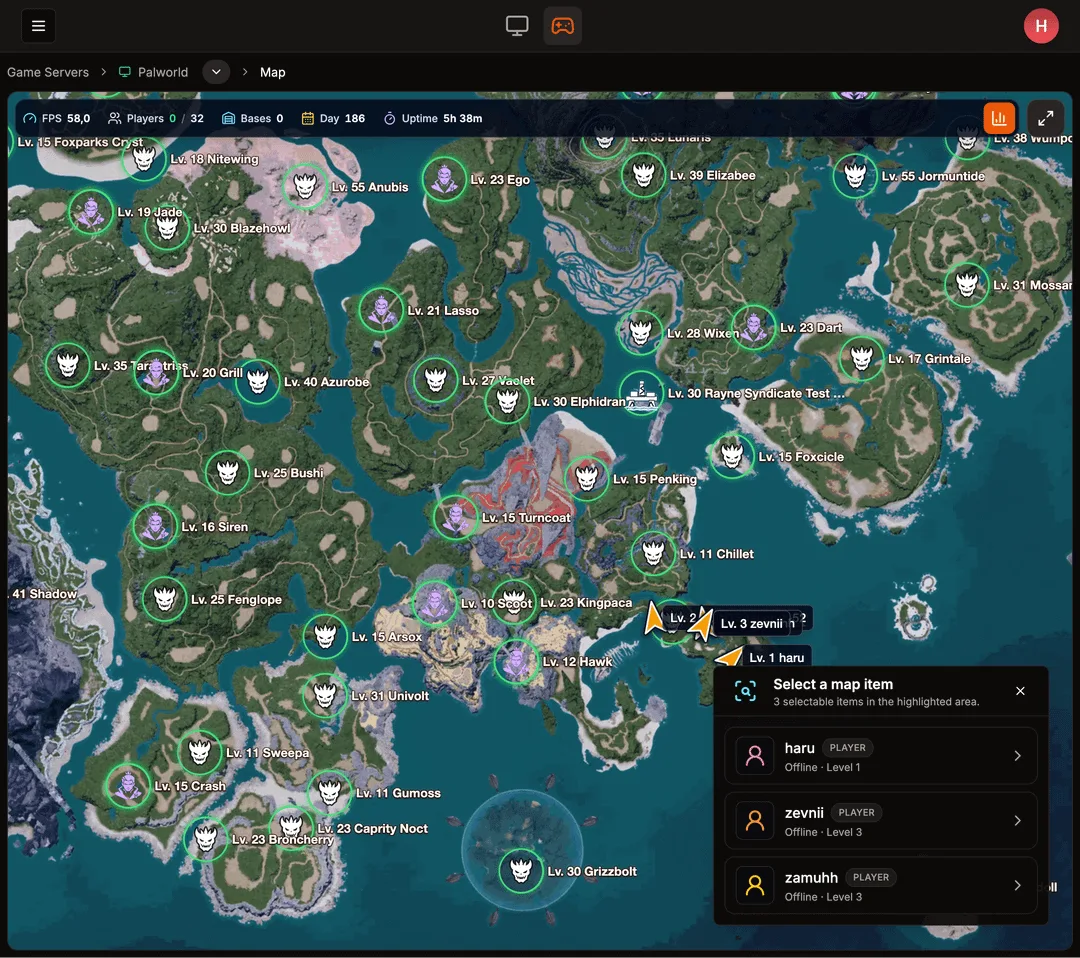
Palworld live map
Players, bases, bosses, dungeons and each player's effigies, shareable with your players by link.
Full remote management
Every server from any browser, the desktop app or your phone, with Files to upload and download in the browser.
Admins and machines
Invite an admin with the permissions you choose, and run every machine, VPS or PC, in one account.
Built and maintained
Built and maintained by HaruHost, game by game.
Supporting a game takes more than a template that installs and starts its server. HaruHost builds every game integration itself, adds what that game's community needs, and keeps it working when the game updates.
Its own server add-ons
Palworld and Valheim servers, and V Rising and Hytale servers on Windows, run HaruHost's own add-on, so players, chat and the Palworld map work without hunting for mods.
Settings checked on every start
Auto Config sets up 20 games on Windows, ARK: Survival Ascended, Enshrouded, Palworld and RuneScape: Dragonwilds on Linux too, with simple settings and checks them each time the server starts.
Fixes ship in HaruHost
When a game update breaks something, the fix comes in a HaruHost release: 15 releases since 1 Oct 2026.
It works with the game itself, not just the server process.
Most server managers start, stop and update a server and show you its console. HaruHost connects to each game, so it knows who is playing, what they say and how the game is set up.
Players
Pals of the North · Palworld
4 online
FR
Freya Admin Online · Lv 47
41h 12mplaytime
KE
Kenji Online · Lv 38
27h 40mplaytime
MA
Mara Online · Lv 32
19h 05mplaytime
TO
Toke Last seen 2 hours ago · Lv 21
8h 51mplaytime
HE
Hel_Raiser Banned Last seen 3 days ago
2h 03mplaytime
Kenji leveled up 37 → 384 min ago
Know every player, not just who's online
HaruHost remembers everyone who joins: playtime, sessions and last seen, levels and level-ups, and a 30-day population graph. Make admins and ban players the way the game itself does.
Players by name for 16 games, history and playtime for 13, levels for 4, bans for 17. No limit on players on paid plans; the free plan shows one.
Chat Logs
Blood Moon PvE · V Rising
Search messages
Global
Draculinaanyone up for Solarus tonight?
Global
Vexin. gear 83 now
Local
Mortisbring blood potions
Server
HaruHostRestart at 22:00 for maintenance
Message players…
Send
Keep every word
Search chat history, even while the server is offline, and send messages to players without joining the game.
Chat Logs for 6 games: ARK: Survival Ascended, ARK: Survival Evolved, Palworld, Project Zomboid, V Rising and Valheim. V Rising on Windows.
Auto Config
Pals of the North · Palworld
EXP rate
Pal capture rate
Work speed
Crossplay
PvP
Max players
Checked and applied on every start
Set up without editing files
Change a game's settings with sliders and switches instead of config files. HaruHost checks them on every start.
Auto Config for 20 games on Windows; ARK: Survival Ascended, Enshrouded, Palworld and RuneScape: Dragonwilds on Linux too.
Everything a Palworld community usually stitches together from separate tools is built in, starting with a live map your players can open themselves.
Live map Players with their levels, bases and guilds, bosses with respawn timers and open dungeons, on the main world and the World Tree. Follow a player, or kick and ban right from the map.
Effigy tracker Each player's collected and missing effigies, across all 407 locations.
Share the map Give your players a public link. Account names stay private, and you can revoke the link at any time.
Mod tools installed for you Every new server gets Palworld's mod tools and HaruHost Core before its first start, plus a Steam Workshop catalog.
Host behind CGNAT The Tunnel gets friends in on Starlink, mobile internet or any network where port forwarding is impossible.
Players and chat Make admins without sharing the admin password, back up and restore a player's save with their Pal storage, and keep global, guild and local chat.
Game server hosts sell player slots on machines shared between customers. A VPS gives you the CPU and memory you pay for. HaruHost is the whole suite on top: every server on one machine, online around the clock, with graphs that show what each one uses.
1
Rent an Ubuntu VPS
From any provider, on x86-64. Size it for the games you run; you can move up a size later.
Or host from your own PC. Friends join without port forwarding.
No VPS needed: turn on the Tunnel and the server on your own PC gets a public address through one of 14 regions, even behind CGNAT, on Starlink or on mobile internet, where port forwarding is impossible. Your PC does what a rented server does. 26 games.
What players need to join, on each server's Details tab.
Invite codes for V Rising instead of addresses.
Direct hosting too, with router and firewall helpers on Windows.
Every server and machine, from any browser or your phone.
Sign in at gsm.haruhost.com on any device to start and update servers, follow players and the console, and change settings. Your servers and files stay on your machine, and no SSH session, FTP client or port forwarding is needed.
FilesPaid Drag files in to upload them, and download files or whole folders as ZIP. An interrupted upload continues where it stopped.
An adminPaid Invite an admin and choose what they can see and do, down to viewing passwords or uploading files.
All your machinesPaid A VPS, a home server and your own PC, together in one account.
Logs See what happened on each machine and server: starts, crashes, updates, backups and settings changes, who did it and, when something failed, the error.
In your language The panel and desktop app speak 23 languages, from Spanish and German to Japanese and Thai, and suggest yours the first time you sign in.
Connect your Discord server from HaruHost and pick the channels. That is the whole setup.
Discord ChatPaid Game chat appears in Discord, and Discord replies appear in game. 5 games, shared between your servers on any of your machines.
Bot commandsPaid Start, stop, restart and update servers, see who's online and for how long, add mods and modpacks.
ModerationPaid Kick, ban and unban players, page through the ban list and give roles such as Admin, with each command allowed only for the people you choose.
Live messages Server Info with status, address and password; Player Activity; Device Info for your machines.
#valheim-chatViking Saturdays · relayed by HaruHost
HaruHost APP
Ragnhild: anyone up for Bonemass tonight?
from Valheim
KA
Kai
omw after dinner, save me a spot
Shown in Valheim
Freya used /server start
HaruHost APP
Pals of the North is online
StatusOnline
Players0 / 32
Address203.0.113.24:8211
Freya used /player ban
HaruHost APP
Hel_Raiser is banned from Pals of the North
Automation Paid
Servers that look after themselves.
Pick a trigger, add steps and choose servers. HaruHost runs it and keeps a step-by-step history of every run.
ScheduledIntervalCrash recoveryHaruHost startsPlayer JoinedPlayer LeftServer update available
Steps include restart, stop, update, save, server commands, messages to players, Server Backup, Device Backup, Discord messages and wait. If HaruHost was offline when a game update came out, your servers are caught up the next time it starts.
TriggerServer update available · Pals of the North
1
Server messageServer restarts in 5 minutes for an update
2
Wait5 minutes
3
Server BackupWorld save · keep 7
4
UpdateInstalls the release and starts the server again
SucceededLast run today at 04:12
Backups Paid
Backups that know the game.
Smaller backups, nothing missing
Keep as many backups as you choose. ARK servers can back up only player data or skip the game's extra saves, and Palworld skips its extra world copies, so backups stay much smaller.
One player at a time
Export and restore a single player: Palworld saves with their Pal storage, ARK: Survival Ascended profiles and Project Zomboid characters.
Any folder, on a schedule
Device Backup saves any folder on the machine from an automation, and Palworld's own backups can be browsed and restored from the Backups page.
Built for
Self-hosting, mods, Discord, and a cheaper way to run servers.
43 games. The deepest support where communities play.
Every game gets install, updates, a console and a file browser; paid plans add file uploads and downloads, backups, automations and the Discord bot. These games get the most: players, chat, mods and Discord Chat.
A host bills each server, every month. On a VPS, another server costs nothing extra while the machine has room, and one HaruHost plan covers 3, 9 or 25 servers.
Game server host
$15.60–$22.59per server, every 30 days
That is $190–$275 a year for one 10-slot Palworld server at large hosts. A second server is a second bill, a third server a third.
Your own host
A VPS
8 GB · 4 cores€14.50 a month
16 GB · 8 cores€26.92 a month
32 GB · 12 cores€45.36 a month
One machine for several servers, as many as its memory and CPU handle.
+
HaruHost
S1 · 3 servers€4.99 a month
G1 · 9 servers€9.99 a month
P1 · 25 servers€14.99 a month
Billed monthly, or 17% less yearly. The whole suite for every server in the plan: players, chat, mods, Discord, backups, automations and full remote management.
Hosts: from comparison pages connecthosting.net, palworldcompanion.com, itechguides.com, checked 2026-10-11.
VPS: netcup list prices, 12-month term, including 19% German VAT (varies by country), checked 2026-10-11; any provider's x86-64 Ubuntu VPS works. HaruHost: S1 €4.99 a month or €49.99 a year, G1 €9.99 a month or €99.99 a year, P1 €14.99 a month or €150 a year, in EUR; your local price and tax are shown at checkout.
Mod managerUE4SS and PalSchema from GitHub: drop mod files in with FilesSteam Workshop: browse and install Workshop mods through SteamCMD
Interactive mapEvery player on the world map, guilds and each player's effigiesShare the map with your players
Valheim
Thunderstore mod profiles
V Rising
Thunderstore mod profiles
Prices in euros. Your local price and tax are shown at checkout. Want to try it first? The free plan runs 1 server with web panel and basic server actions, without the paid features.
Questions
Is HaruHost just a server panel?
No. HaruHost is the complete game server suite for a community. Besides installing, updating and running servers for 43 games, it builds in what communities otherwise piece together from separate tools: players with playtime, levels, kicks and bans; searchable chat logs; mods and mod profiles; a Discord bot with moderation and two-way Discord chat; automations; game-aware backups; the Palworld live map; and a Tunnel. HaruHost builds and maintains every game integration itself, including its own server add-ons. It runs as a service on Windows and Linux and is managed from anywhere through the web panel, desktop app and Discord.
How much does HaruHost cost?
Plans cost €4.99 a month for 3 servers, €9.99 a month for 9 servers and €14.99 a month for 25 servers. Billed yearly, they cost 17% less: €49.99, €99.99 or €150 a year. Plans count game servers, never player slots, and cover them on all your machines, with the Tunnel, automations, backups, the Discord bot and player tracking with no player limit. A free plan runs 1 server with the web panel and basic server actions.
Is a VPS with HaruHost better than renting a game server?
For a community, usually yes. A host sells player slots on machines shared between customers and bills every server separately. A VPS gives you the CPU and memory you pay for and runs as many servers as it fits, and one HaruHost plan covers all of them with players, chat, mods, Discord, automations and backups built in.
Can I run HaruHost on a VPS?
Yes. Rent an Ubuntu VPS, run one command over SSH and sign in. HaruHost installs itself as a service, installs Docker for you and runs servers for the 43 games that support Linux, managed from the web panel. Players join at the VPS's public address.
Does it run on Linux?
Yes. HaruHost runs on Linux as a background service with the web panel, or as a desktop app, and all 43 games run on Linux. Game servers run in Docker: on Ubuntu, the background service installs it for you; with the desktop app or on other distributions, install Docker Engine first. HaruHost's Linux build is for x86-64.
Do my friends need port forwarding?
Not on a VPS: players join at its public address, once the game's ports are open in your provider's firewall if it has one. At home, the Tunnel (paid plans) lets friends join 26 games through one of 14 regions without router changes; V Rising friends join with an invite code. For other games on Windows, HaruHost helps open the ports on your router and firewall.
Does my PC have to stay on?
Only if the server runs on your PC. On a VPS or an always-on home server, your servers stay online around the clock. HaruHost starts with the machine, and an automation (paid plans) can start your servers after a reboot.
Do I need to host a Discord bot?
No. Connect your Discord server from HaruHost and the bot works without hosting or coding anything. The Discord bot and Discord Chat are part of the paid plans.
What does HaruHost replace?
The separate tools a game community usually runs: a game server host, a server panel, a Discord bot, a Discord chat bridge, a mod manager, a player tracker with bans and chat history, scheduled restarts and alerts, backups, a tunnel and file transfers. One plan covers them for every server on all your machines.
Is HaruHost available in my language?
The web panel and desktop app are available in 23 languages: English, Spanish, Portuguese (Brazil), Portuguese (Portugal), French, German, Italian, Dutch, Polish, Romanian, Czech, Hungarian, Greek, Swedish, Danish, Norwegian, Lithuanian, Latvian, Estonian, Japanese, Korean, Simplified Chinese and Thai. The first time you sign in, HaruHost suggests the language of your region, and you can change it at any time. The games' own setting names and legal texts stay in English.
Which games are supported?
43 games, including Palworld, Valheim, V Rising, Project Zomboid, ARK, Minecraft and Hytale. Each game page lists exactly what HaruHost does for it.
The complete community suite, one command away.
One command on an Ubuntu VPS, or an installer on Windows. One plan for every server you run, from €4.99 a month.
 HaruHost