
Mod Installer
Use this guide to install and maintain Project Zomboid mods with the HaruHost mod installer.
Location
Section titled “Location”Game Servers →Your Game Server Name→ Auto Config → Mods
Add mods
Section titled “Add mods”- Open the Project Zomboid mod installer.
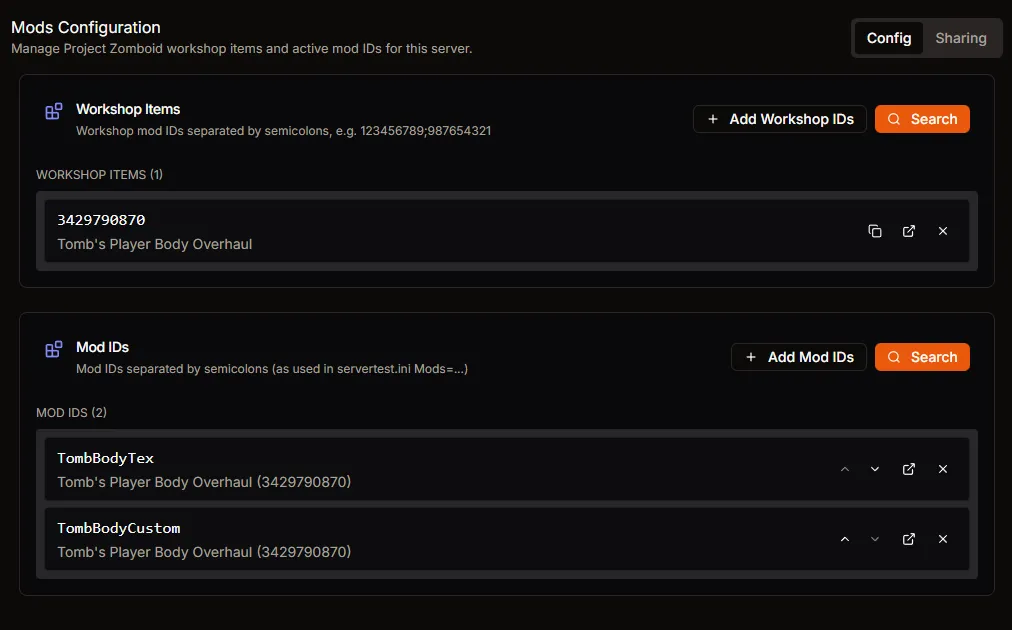
- Search Steam Workshop content by name or ID.
- Add the selected Workshop IDs and Mod IDs to your server list.
Organize the list
Section titled “Organize the list”- Reorder entries when load order matters.
- Remove unused entries to keep startup clean.
- Save changes.
Apply changes
Section titled “Apply changes”- Restart the server after any mod list update.
- Confirm startup logs and perform a join test.