 HaruHost
Game server tunneling Paid
Host from your own PC. Friends join without port forwarding.
The Tunnel gives a game server running on your own machine a public address through one of 14 relay regions. Friends join even behind CGNAT, on Starlink or on mobile internet, with no router, firewall or public IP setup. Turn it on from the server's Details tab. The Tunnel works for 47 games on Windows, and for 37 games when HaruHost runs as a service on Linux.
Your own PC as the host
A rented game server is a machine in a datacenter with a public address. The Tunnel gives the machine you already own that public address, so it does the same job: no monthly server rent, no player slots, and the server, its files and mods stay yours.
-
1
Run the server at home
On your PC or a home server, Windows or Linux. Your PC or home server is the host; the Tunnel gives it the address players join.
-
2
Turn on the Tunnel
On the server's Details tab, switch the Tunnel on and pick the relay region closest to you or your players. Your server connects outward, so nothing on your router has to open.
-
3
Share the join details
The Details tab shows what players need: the address (the invite code for V Rising), the server title and the password if the server has one.
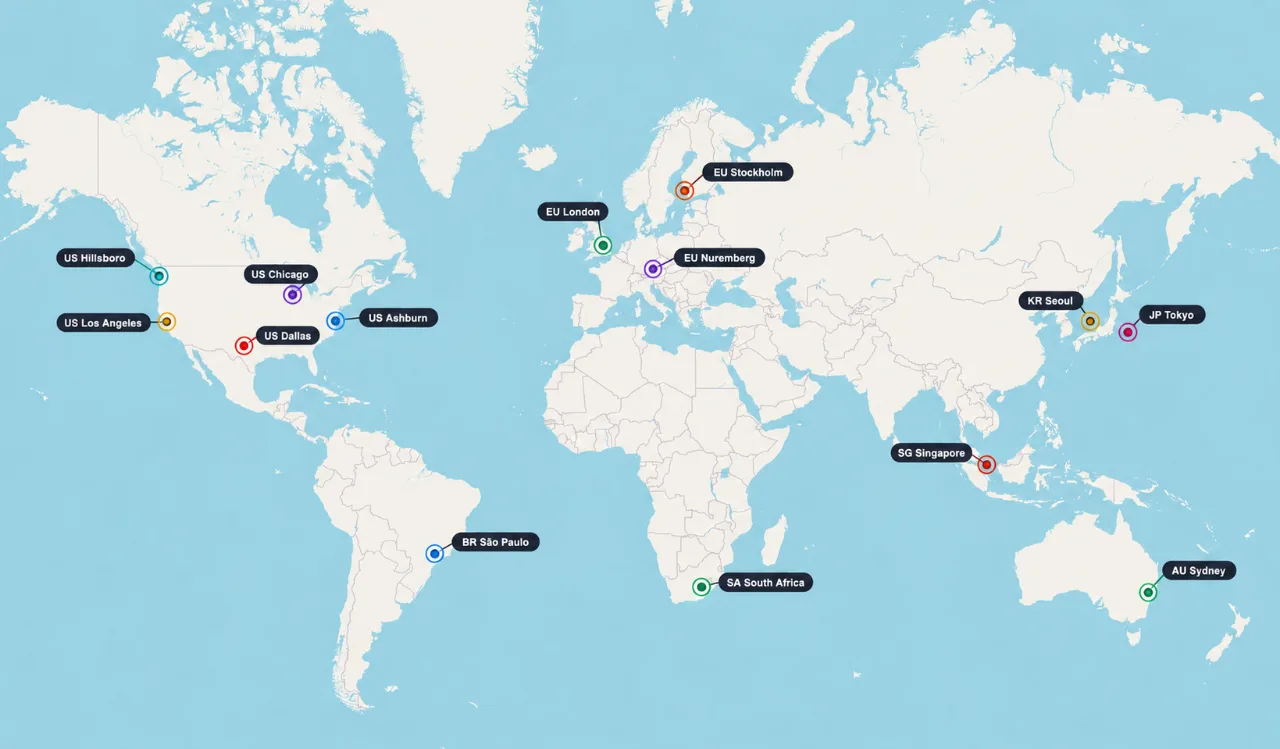
14 relay regions on six continents
Choose the region closest to you or your players for the best latency. No region near you? Request one in the HaruHost Discord; requests decide where new regions go.
Europe
London, Nuremberg, Stockholm
North America
Ashburn, Chicago, Dallas, Hillsboro, Los Angeles
South America
São Paulo
Asia
Tokyo, Seoul, Singapore
Africa
South Africa
Oceania
Sydney
47 games with the Tunnel
How friends join depends on the game. Each game page lists everything else HaruHost does for it.
In the game's server list
Friends find the server in the game's own server list, like any public server.
- ARK: Survival Ascended · Join Game → Unofficial with Show Player Servers on; search the server title
- Palworld · Community Servers; search the world name, or connect by address
- Path of Titans · Windows
- The Isle · Windows
Direct join
Friends join by the address on the server's Details tab, the same way as any dedicated server of these games.
- Core Keeper · Join with IP
- Craftopia
- Don't Starve Together
- Eco
- Factorio
- Frozen Flame
- Hytale · Servers → Add Server
- Minecraft: Bedrock Edition
- Minecraft: Java Edition · Multiplayer → Add Server
- Necesse
- Nightingale · Windows
- Project Zomboid · Windows · Favorites → add the server
- Terraria
- tModLoader (Terraria)
- Windrose · Connect to server → Direct IP
On Windows, as a service or as administrator
These games' tunnel on Windows needs HaruHost to run as a service, or the app to run as administrator; without those rights, HaruHost asks for them and offers to relaunch as administrator. It needs Windows 10 version 2004 or later, or Windows 11. Players join these games' tunneled servers this way.
- 7 Days to Die · Server list
- American Truck Simulator · Server list
- ARK: Survival Evolved · Server list
- Arma 3 · Server list
- Arma Reforger · Server list
- Arma Reforger Experimental · Server list
- Assetto Corsa · Direct join
- Avorion · Steam networking
- Barotrauma · Server list
- Conan Exiles · Server list
- DayZ · Server list
- Empyrion: Galactic Survival · Server list
- Enshrouded · Direct join · Join → Dedicated Server → Search by IPv4/Domain
- Euro Truck Simulator 2 · Server list
- ICARUS · Server list
- RuneScape: Dragonwilds · Server list
- Rust · Server list
- Satisfactory · Direct join · Server Manager → Add Server
- Sons of the Forest · Server list
- Soulmask · Server list
- StarRupture · Direct join
- The Forest · Server list
- V Rising · Server list
- Valheim · Crossplay join code
Also on Windows
These games use the Tunnel on Windows: the server gets a public address without port forwarding, shown on its Details tab.
- Abiotic Factor · As a service or as administrator
- Astro Colony · As a service or as administrator
- ASTRONEER · As a service or as administrator
- Unturned · As a service or as administrator
On Linux, with HaruHost as a service
When HaruHost runs as a service on Linux, which the one-command install sets up, friends join these games' tunneled servers this way. Games marked Windows above join this way on Linux.
- Abiotic Factor · Server list
- ARK: Survival Evolved · Server list · search the Lobby Name
- Arma 3 · Server list · search the Lobby Name
- Arma Reforger · Server list · search the Lobby Name
- Conan Exiles · Server list · search the Lobby Name
- DayZ · Server list
- Enshrouded · Steam favorite, then the game's Favorites
- ICARUS · Server list · search the Lobby Name
- Nightingale · Direct join
- Path of Titans · Server list
- Project Zomboid · Server list
- Rust · Server list · search the Lobby Name
- Sons of the Forest · Server list · search the Lobby Name
- Soulmask · Server list · search the Lobby Name
- StarRupture · Direct join
- The Forest · Server list · search the Lobby Name
- The Isle · Server list
- V Rising · Server list · search the Lobby Name
- Valheim · Direct join · Join IP
Tunnel questions
How do I host a game server without port forwarding?
1. Install HaruHost on your PC or home server and sign in. 2. Create the server for your game. 3. Turn on the Tunnel (paid plans) on the Connection step and pick one of 14 regions. 4. Share the address from the server's Details tab, or let players find the server in the game's own list where the game lists it. Players install nothing, and the whole manager comes with it: players, mods, Discord, automations and backups.
What is the HaruHost Tunnel?
A public connection path for game servers that run on your own machine. The server stays on your hardware; HaruHost provides the address players join through.
Why use the Tunnel?
It saves the hours or days that firewall rules, port forwarding and public IP setup can take. Supported games just work, and you turn the Tunnel on or off in HaruHost whenever you like, while manual firewall and port forwarding rules stay open until you remove them yourself.
Does the Tunnel work behind CGNAT?
Yes. It is made for CGNAT and similar networks where players cannot reach your home network directly, such as Starlink and mobile internet: your server connects outward through HaruHost instead.
Do I still need port forwarding or firewall rules?
No. Avoiding router port forwarding and firewall setup is the main reason to use the Tunnel.
How do I turn the Tunnel on?
Open the game server, go to the Details tab and turn on the Tunnel switch; a running server restarts to apply it. Then share what the Details tab shows: the address (the invite code for V Rising), the server title and the password if your server has one. Windrose also needs Auto Config turned on so HaruHost can write the tunnel address into its settings.
Which games support the Tunnel, and how do friends join?
47 games. Friends join in the game's server list: ARK: Survival Ascended, Palworld, Path of Titans on Windows and The Isle on Windows; by direct join, as any dedicated server of the game: Core Keeper, Craftopia, Don't Starve Together, Eco, Factorio, Frozen Flame, Hytale, Minecraft: Bedrock Edition, Minecraft: Java Edition, Necesse, Nightingale on Windows, Project Zomboid on Windows, Terraria, tModLoader (Terraria) and Windrose. When HaruHost runs as a service on Linux, friends join in the game's server list: Abiotic Factor, ARK: Survival Evolved, Arma 3, Arma Reforger, Conan Exiles, DayZ, ICARUS, Path of Titans, Project Zomboid, Rust, Sons of the Forest, Soulmask, The Forest, The Isle and V Rising; by direct join: Nightingale, StarRupture and Valheim; through a Steam favorite, then the game's own Favorites: Enshrouded. On Windows, when HaruHost runs as a service or as administrator, friends join in the game's server list: 7 Days to Die, American Truck Simulator, ARK: Survival Evolved, Arma 3, Arma Reforger, Arma Reforger Experimental, Barotrauma, Conan Exiles, DayZ, Empyrion: Galactic Survival, Euro Truck Simulator 2, ICARUS, RuneScape: Dragonwilds, Rust, Sons of the Forest, Soulmask, The Forest and V Rising; by direct join: Assetto Corsa, Enshrouded, Satisfactory and StarRupture; with crossplay, by the server's join code: Valheim. When HaruHost runs as a service or as administrator, the Tunnel also works on Windows for Abiotic Factor, Astro Colony, ASTRONEER and Unturned.
Does HaruHost host my game server?
You do: the server runs on your machine, and the Tunnel gives it the address players join.
Can I choose the relay region?
Yes, any of the 14 regions. Pick the one closest to you or your players for the best latency.
Does the Tunnel add latency?
A little, because traffic passes through the relay region. For most servers it is negligible unless the region is far away; a stable internet connection where the server runs matters more.
Does the Tunnel hide my home IP?
Players connect to the relay address, so your home IP is not shown to them. Add-ons or other software on the machine that connect to outside services on their own still use your home connection.
What if someone attacks the tunnel address with a DDoS?
An attack on the tunnel address hits the relay service, not your connection. Your machine is not immune to attacks by other means, for example if its real IP is known some other way or other services are exposed.
Do players need anything extra to join through the Tunnel?
No. The Tunnel passes the game's own traffic through unchanged, so players join with the normal game, as they would without the Tunnel.
Is bandwidth unlimited?
No. Each plan has a bandwidth ceiling, monitored to keep traffic fair. Game server traffic is small, so for most servers this is not a concern unless the server is very busy.
Can I use the Tunnel for other things than game servers?
No. The Tunnel is only for supported game servers.