 HaruHost
ARK: Survival Ascended server guide
ARK Survival Ascended common server visibility mistakes and how to fix them
In this guide I'll show you the most common issues that keep your ARK Survival Ascended server from showing up publicly, and how to fix each one. At the end I'll also show you a tool that fixes the most difficult parts for you automatically.
The server visibility issue usually comes from one of three directions: the server setup is wrong, the game's server list is hiding it from you, or your server is blocked from the internet. All of these can be fixed, so let's go through them.
1. Lobby filters hide your server
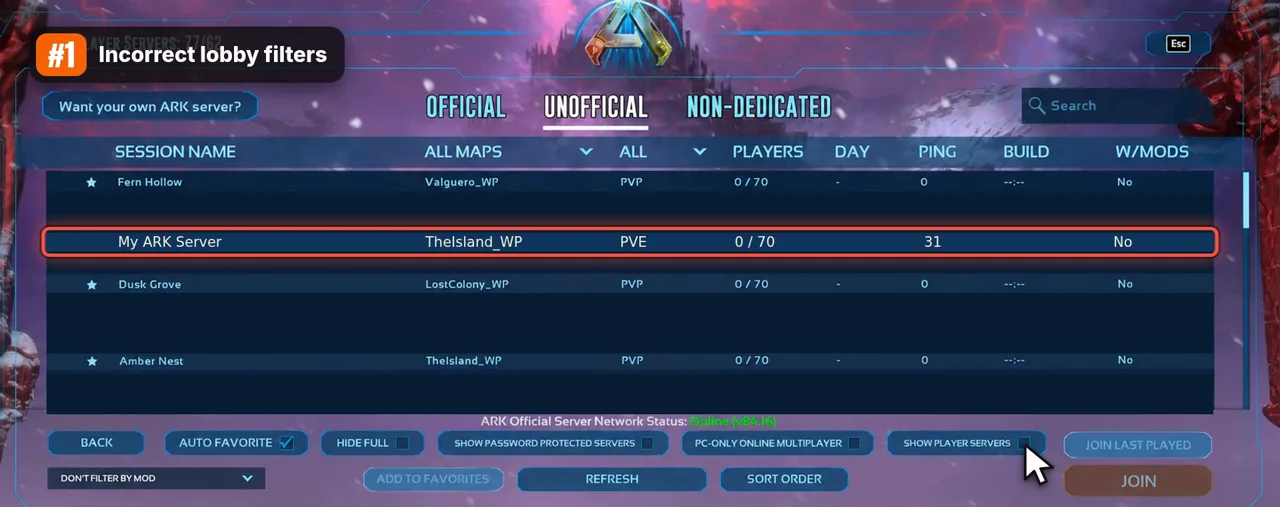
ARK's server browser shows far fewer servers than actually exist. Three of its filters can hide yours even while it runs perfectly.
- Unofficial tab. Official is only for servers run by the game's publisher. Any server you run yourself, whether at home, on a VPS or anywhere else, is listed under Unofficial.
- Show Player Servers. This box is off by default. While it's off, the Unofficial list only shows servers from the game's partnered hosting companies and leaves out everything players run themselves, including yours. Tick it, and your server becomes searchable.
- The password filter. If you gave your server a password, check that the list isn't set to hide password-protected servers. That setting filters your server out without any hint that it's online.
If you've only ever looked at the list with the default settings, start here. It's the most common reason by far.
2. The search needs the exact server name
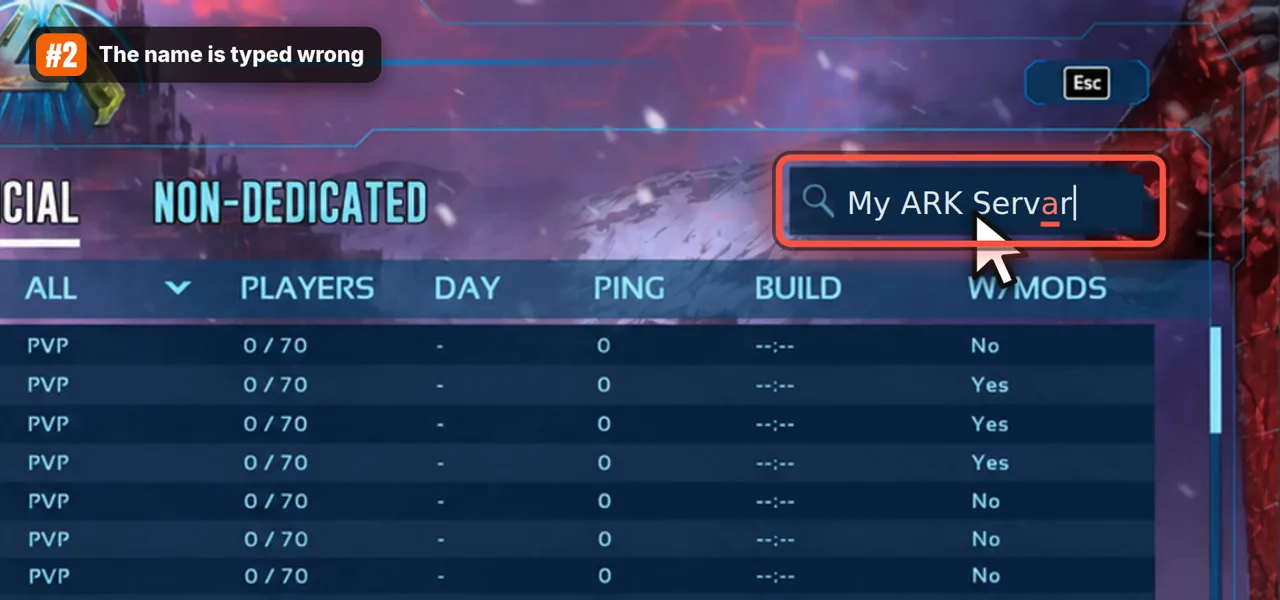
There are thousands of player servers, so you'll find yours through the search box. The search only finds a server when the name matches. "My ARK Servar" or "MyARK Server" won't find "My ARK Server". The safest way is to copy the Session Name from your server settings and paste it into the search.
If the name is right and the server still doesn't appear, check which name the server actually started with. The name you put in the settings and the name the server runs with aren't always the same. When the settings don't load (for example, the file was edited while the server was running and got overwritten when it shut down), the server quietly starts with a default name. Your search then finds nothing, because no server with your name exists.
The server writes the name it really uses into its log at startup:
Server: "My ARK Server" has successfully started!If you see a different name there, your settings didn't apply. Fix them with the server stopped, then start it again.
3. The list doesn't refresh after you change filters
Sometimes nothing is wrong with your server or your settings, and the list just hasn't caught up. There's a bug in ARK where the server list keeps showing the results from before you changed your filters. You tick Show Player Servers, and the list looks exactly the same.
After changing filters, press Refresh twice and give it a few seconds to load before deciding your server isn't there.
4. Your server is on an older version than your game
ARK patches often, and the game updates itself through Steam or your console store. Your dedicated server doesn't. It stays on the version it was installed with until you update it. Once the two drift apart, the browser hides the server, because your game can't join it.
What matters is the number before the dot. The version shows in the corner of ARK's main menu, for example v97.17:
- A server on 97.5 still works with a 97.17 game, because both are 97.
- A server on 94 no longer works with a 97 game, and it disappears from the list.
If your server is behind, update it the same way you installed it, then start it again. If you're not sure which version it's on, update it anyway: it's quick and rules this reason out. Expect to repeat this after every ARK patch that bumps the number before the dot.
5. The server hasn't finished starting, or it crashed
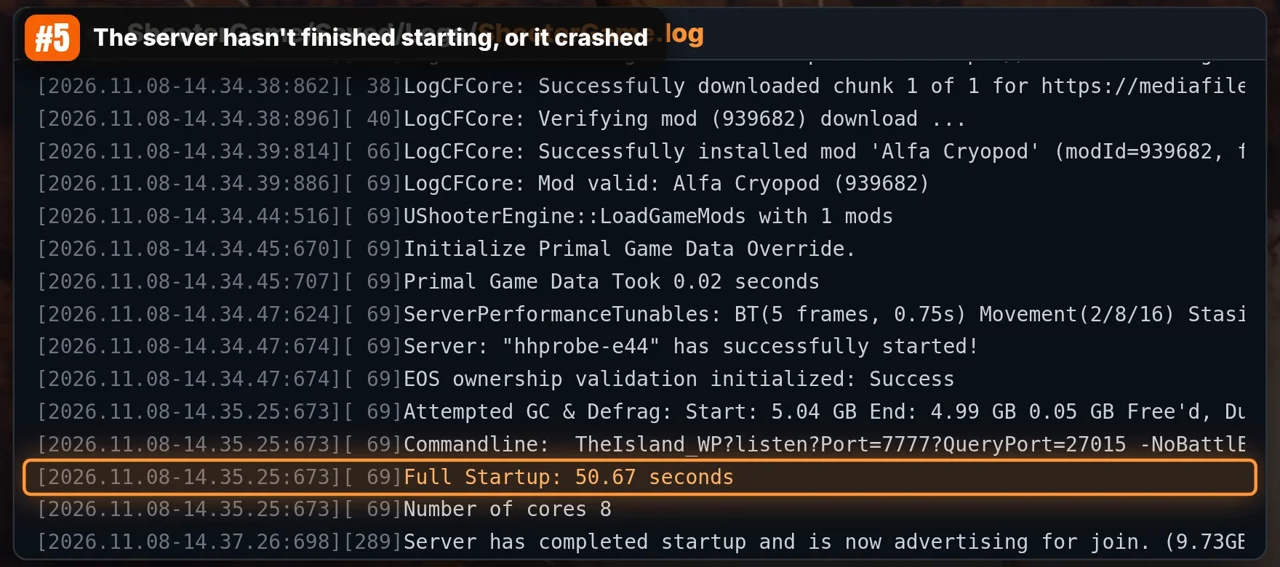
An ARK server isn't in the list the moment you start it. It first loads the map, the save and any mods, which can take a couple of minutes. It only appears in the list once all of that is done. If you search right after starting it, it's normal not to find it yet.
To know for sure, open the server's log, ShooterGame.log in ShooterGame\Saved\Logs, and look for the line Full Startup:
- If it's there, the server finished starting and is running.
- If it isn't there and the log ends in an error, the server crashed during startup and never made it into the list. The last lines before the error usually name the cause: not enough memory, a mod that fails to load, or a wrong setting.
6. The internet can't reach your server
For other players to see and join your server, connections from the internet have to reach the PC or VPS it runs on. On a home connection, two things stand in the way by default:
- Your firewall blocks incoming connections it doesn't know. Allow the ARK server in it.
- Your router doesn't know which device in your home the incoming connections are for. Forward the server's port, by default 7777 UDP, to the PC running the server.
Some internet providers don't give your home its own public IPv4 address. Instead they share one address between many customers, which is called CGNAT. You can tell when the internet address your router shows differs from the one a "what is my IP" site shows, or when your router's address starts with 100.64 to 100.127. Behind CGNAT, port forwarding can't work, because your router isn't the one facing the internet. Nobody outside your home can reach the server, however you set up your router.
7. Crossplay isn't set up for console players
If you play on PC and your friends on Xbox or PlayStation can't see the server, it's usually not visibility in general but the platforms the server lets in. Console players only see servers that allow their platform. Two things must be true:
- The server is started with
-ServerPlatform=ALL, so it accepts PC, Xbox and PlayStation. - Every mod on the server supports console. One PC-only mod is enough to keep console players out.
Let HaruHost handle it
Most of the steps above are things you only have to deal with because you're running the server yourself: keeping it updated, opening it to the internet, and checking logs. HaruHost takes those over while the server stays yours, on your own PC or a VPS, on Windows or Linux.
-
Setup: it sets up the ARK server for you.
-
Tunnel: turn it on, and players join without any port forwarding, even behind CGNAT.
That covers reason 6. -
Updates: when ARK patches, it can update the server by itself.
That covers reason 4. -
Control: you run all of it from the app, any browser, or your phone.
Did you run into one of these problems? Which one was it, and did this guide help you fix it? Tell us on Discord.
Questions
Why did my ARK server disappear from the list after an update?
ARK patches often, and the game updates itself through Steam or your console store. Your dedicated server doesn't. It stays on the version it was installed with until you update it. Once the two drift apart, the browser hides the server, because your game can't join it.
How do I know my ARK server has finished starting?
Open the server's log, ShooterGame.log in ShooterGame\Saved\Logs, and look for the line Full Startup. If it's there, the server finished starting and is running.
Why can't Xbox and PlayStation players see my ARK server?
Console players only see servers that allow their platform. The server has to be started with -ServerPlatform=ALL, and every mod on the server has to support console.
Related guides
ARK: Survival Ascended guides
Setting it up
- Set up a dedicated server
- Set up on Windows
- Set up on Linux
- Move an existing server
- Install mods
- ARK Server API plugins
- Clusters and shared settings
- Several maps on one PC
Getting players in
- How friends join
- Not showing in the server list
- Friends can't join
- Host without port forwarding
- Ports and port forwarding
- Crossplay with Xbox and PS5
- Private server and whitelist
- Disable BattlEye
Game settings
- Server settings
- Taming speed
- Breeding and imprinting
- Harvest rates and crops
- XP rates
- Max wild dino level
- Custom levels and level cap
- Stack sizes
- Player stats and speed
- Dino stats and mutations
- Engrams and engram points
- Supply crate loot
- Crafting, spoiling and items
- Creature spawns
- Day and night speed
- PvE, PvP and tribes
- Structures and decay
- Cryopods and tame limits
Running it